Nova Google AutoComplete Field Package
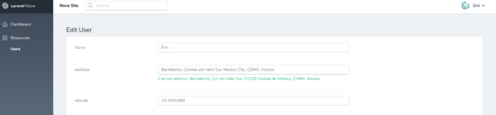
This field allows you to work with Google Places API to autocomplete on user input and get the full real address with all the metadata (like latitude and longitude).
Installation
You can install the package in to a Laravel app that uses Nova via composer:
composer require emilianotisato/nova-google-autocomplete-fieldNow publish config and localization files:
php artisan vendor:publish --provider="EmilianoTisato\GoogleAutocomplete\FieldServiceProvider"Create an app and enable Places API and create credentials to get your API key https://console.developers.google.com
Add the below to your .env file
ADDRESS_AUTOCOMPLETE_API_KEY=############################Usage
Add the use declaration to your resource and use the fields:
use EmilianoTisato\GoogleAutocomplete\GoogleAutocomplete;
// ....

GoogleAutocomplete::make('Address'),

//You can add a country or countries to autocomplete or leave empty for all.

// Specify a single country
GoogleAutocomplete::make('Address')
          ->countries('US'),

// Specify multiple countries [array]
GoogleAutocomplete::make('Address')
          ->countries(['US','AU]),
You can access other parameter like latitude, longitude, street_number, route, locality, administrative_area_level_1, country, postal_code, along with everything available in the - every field present in the PlaceResult object
use EmilianoTisato\GoogleAutocomplete\AddressMetadata;
use EmilianoTisato\GoogleAutocomplete\GoogleAutocomplete;

// Now this address field will search and store the address as a string, but also made available the values in the withValues array
GoogleAutocomplete::make('Address')->withValues(['latitude', 'longitude']),

// And you can store the values by autocomplete like this
AddressMetadata::make('lat')->fromValue('latitude'),
AddressMetadata::make('long')->fromValue('longitude'),

// You can disable the field so the user can't edit the metadata
AddressMetadata::make('long')->fromValue('longitude')->disabled(),

// Or you can make the field invisible in the form but collect the data anyways
AddressMetadata::make('long')->fromValue('longitude')->invisible(),
Combine Values
If you want to concatenate certain elements of the geocoded object that is returned by Google, using {{ and }}, wrap the key like you would above; like so:
use EmilianoTisato\GoogleAutocomplete\AddressMetadata;
use EmilianoTisato\GoogleAutocomplete\GoogleAutocomplete;

GoogleAutocomplete::make('Address')->withValues(['latitude', 'longitude']),

AddressMetadata::make('coordinates')->fromValue('{{latitude}}, {{longitude}}'),
So the value that would be rendered within the coordinates input would be something like:
39.3315476, -94.9363912
Define Short/Long Value
If you would like to use the long_name version of the geocoded object (Kansas versus KS), you can define the GoogleAutocomplete field values with dot notation followed with the name version you want to use; like so:
use EmilianoTisato\GoogleAutocomplete\GoogleAutocomplete;

GoogleAutocomplete::make('Address')
    ->withValues([
        'route.short_name',
        'administrative_area_level_1.long_name',
    ]),
Which would return:
route: W 143rd St
administrative_area_level_1: Kansas
You can change the type of places that are returned by the autocomplete using the placeType() method. You can use any of the values listed at https://developers.google.com/places/supported_types#table3
use EmilianoTisato\GoogleAutocomplete\AddressMetadata;
use EmilianoTisato\GoogleAutocomplete\GoogleAutocomplete;

// This autocomplete field will return results that match a business name instead of address.
// All the same address data is still stored.
GoogleAutocomplete::make('Address')->placeType('establishment');
Localization
If you want this package in your language, just create a json lang file in your resources/lang/vendor/google-autocomplete folder. Example
resources/lang/vendor/google-autocomplete/es.json