smart-search-php
Simple (yet powerful) PHP search/filter providing unified results in multiple contexts:
- MySQL/other databases (ie: "where" clause builder)
- PHP arrays
- Laravel Collections
- Laravel Models
- Laravel Nova Resources
Simple Google-style search strings perform complex filter operations across multiple fields.
(PHP backend equivalent of miking/smart-search-filter javascript library JS library)
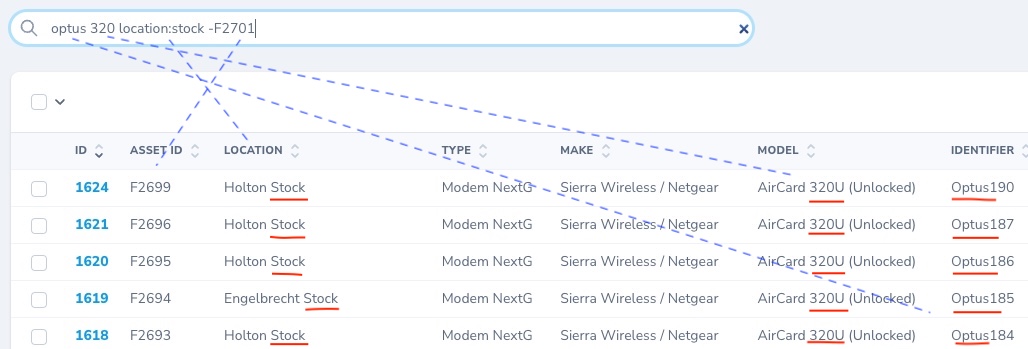
Screenshot:

Installation:
Require this package in the composer.json of your project.
composer require faithfm/smart-search-phpNote: an additional dependency must be manually installed for Laravel Models & Nova Resources. (Applies to Laravel <= 8.x)
Usage Examples:
Start by creating an instance of SmartSearch with the search string, and a list of default search fields:
use FaithFM\SmartSearch\SmartSearch;

$search = 'optus 320 location:stock -F2701';
$smartSearch = new SmartSearch($search, 'asset_id|location|type|make|model|identifier');
The parsed search-string can now be used to perform filtering in one or more contexts:
- Context 1 - PHP Array filtering:
$filtered = $smartSearch->filterArray($items));- Context 2 - Laravel Collection filtering:
$filteredCollection = $smartSearch->filterCollection($myCollection));- Context 3 - SQL Database where-clause filtering:
$whereClause = $smartSearch->getSqlFilter());- Context 4 - Laravel Database Query Builder (DB or Model) filtering:
$data = DB::table('my_table')::where($smartSearch->getBuilderFilter())->get();
// OR
$data = MyModel::where( $smartSearch->getBuilderFilter() )->get();- Context 5 - Laravel Eloquent Model filtering:
MyModel::smartSearch('joe', 'location|type')->get();- Context 6 - Laravel Nova Resource filtering: (ie: as shown in the screenshot above)
class MyResource extends Resource
{
    use SmartSearchableNovaResource;
    ...
Search Syntax:
The related miking/smart-search-filter javascript library includes documentation of how a simple Google-style search syntax is used to perform complex filter operations across multiple fields.
Note: Used together these two libraries provide a simple, unified, yet powerful approach to front-end/back-end filtering in modern web applications.
Debug Information:
Under the hood, a "filter operations" array is created when a search string is parsed.
The getFilterOpsDescription() function provides a human-readable representation showing the parsed intent of the search string, and parsing errors are also available:
var_dump($smartSearch->errors);
var_dump($smartSearch->getFilterOpsDescription());
Advanced Options:
The above examples have demonstrated the simple case where only two arguments are provided to the SmartSearch constructor, however a number of other advanced options are also available.
new SmartSearch($searchString, $defaultFields = "", $allowedFields = "", $options = [], Closure $sqlEscapeStringFn = null)Notes:
-
$allowedFieldsare the same as$defaultFieldsif not specified explicitly. -
Fields lists can be specified in a many different ways:
$defaultFields = 'location,type';       // comma-separated
$defaultFields = 'location, type';      // comma-separated (with spaces)
$defaultFields = 'location|type';       // pipe-separated
$defaultFields = ['location', 'type'];  // array format
//... and pretty much anything else that can be cast to an array (of strings)- The
$optionsparameter accepts an associative array or StdClass object and allows things like case sensitivity and sql wildcard characters to be defined. Default options are:
const DEFAULT_OPTIONS = [
    'caseSensitive' => false,
    'sqlWildcard' => '%',
    'sqlWildcardSingleChar' => '_',
];
Note: all filters are currently case-insensitive. The
caseSensitiveoption does not currently work.
- The
$sqlEscapeStringFncan be specified in the constructor instead of callingsetSqlEscapeStringFn()later.