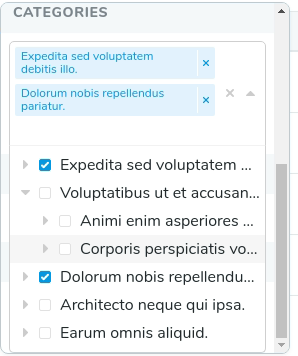
Laravel Nova Nested Tree Filter
custom nested tree filter for laravel nova.

This filter uses tree provided by kalnoy/nestedset package
This filter uses riophae/vue-treeselect under the hood
Install
Let's assume you need to filter Products that are related to nested Category model
First of all, require using gekich/nested-tree-filter
composer require gekich/nested-tree-filter
Create new filter using, nova:filter, for example:
php artisan nova:filter CategoryFilter
Make your newly created class extend Gekich\NestedTreeFilter\NestedTreeFilter:
use Gekich\NestedTreeFilter\NestedTreeFilter;
class CategoryFilter extends NestedTreeFilter
{
//
}Remove all code from newly created class CategoryFilter, and setup:
class CategoryFilter extends NestedTreeFilter
{
    public $filterModel = \App\Category::class; // - nested tree model
    public $filterRelation = 'categories'; // - relation that filter uses
    public $name = 'Categories filter'; // - filter name
    public $idKey = 'id'; // - id column
    public $labelKey = 'name'; // - label column name
}
Also there are placeholder option
public $placeholder = 'Select...'; And multiple select option
public $multiple = true;Usage
Include the filter you created during instalation in Laravel nova Product resource:
use App\Nova\Filters\CategoryFilter;

class Product extends Resource
{
..
    public function filters(Request $request)
    {
        return [
            CategoryFilter::make()
        ];
    }
Filter is ready to use. You can apply this filter to filter to resource relation that set in $filterRelation
Contributing
Feel free to suggest changes, ask for new features or fix bugs yourself.
Hope this package will be usefull for you.
License
The MIT License (MIT). Please see License File for more information.