
Making Laravel Nova Tab Translatable Nova 5 ready


This package contains a NovaTabTranslatable class you can use to make any Nova field type translatable with tabs. Use the master branch for Nova 5 and the 1.x branch for Nova 4.
Imagine you have this fields method in a Post Nova resource:
use Kongulov\NovaTabTranslatable\NovaTabTranslatable;

...

public function fields(Request $request)
{
    return [
        ID::make()->sortable(),

        NovaTabTranslatable::make([
            SluggableText::make('Title')->slug('Slug'),
            Slug::make('Slug')->readonly(),
            Trix::make('text'),
            Text::make('Keywords'),
            Text::make('Description'),
        ]),
    ];
}
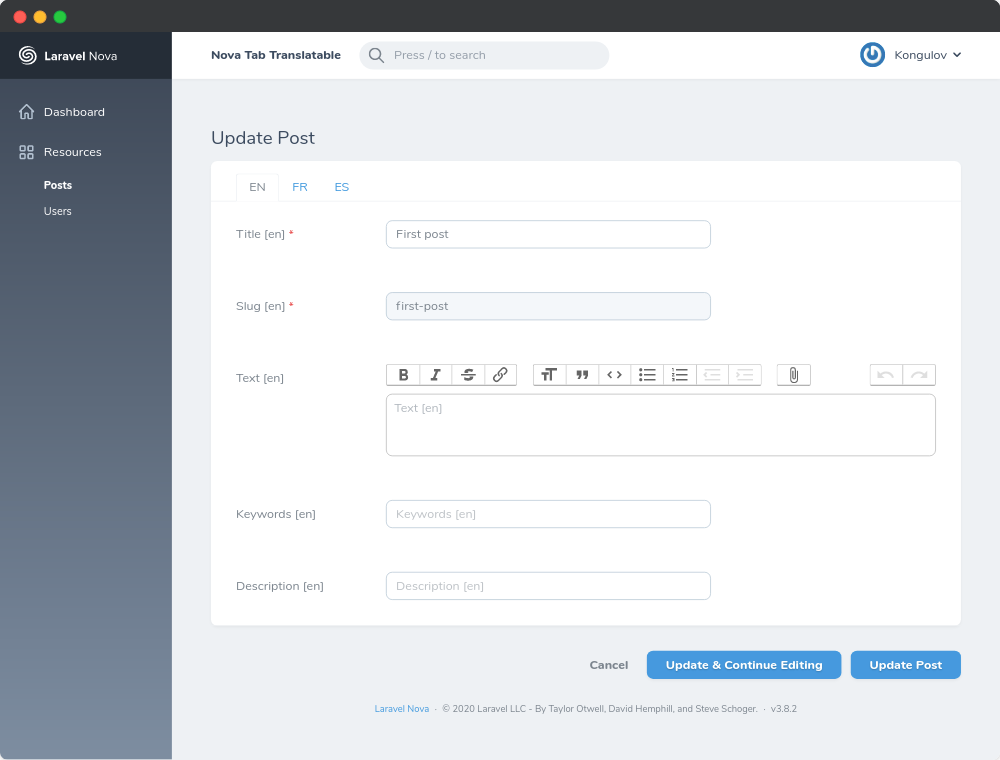
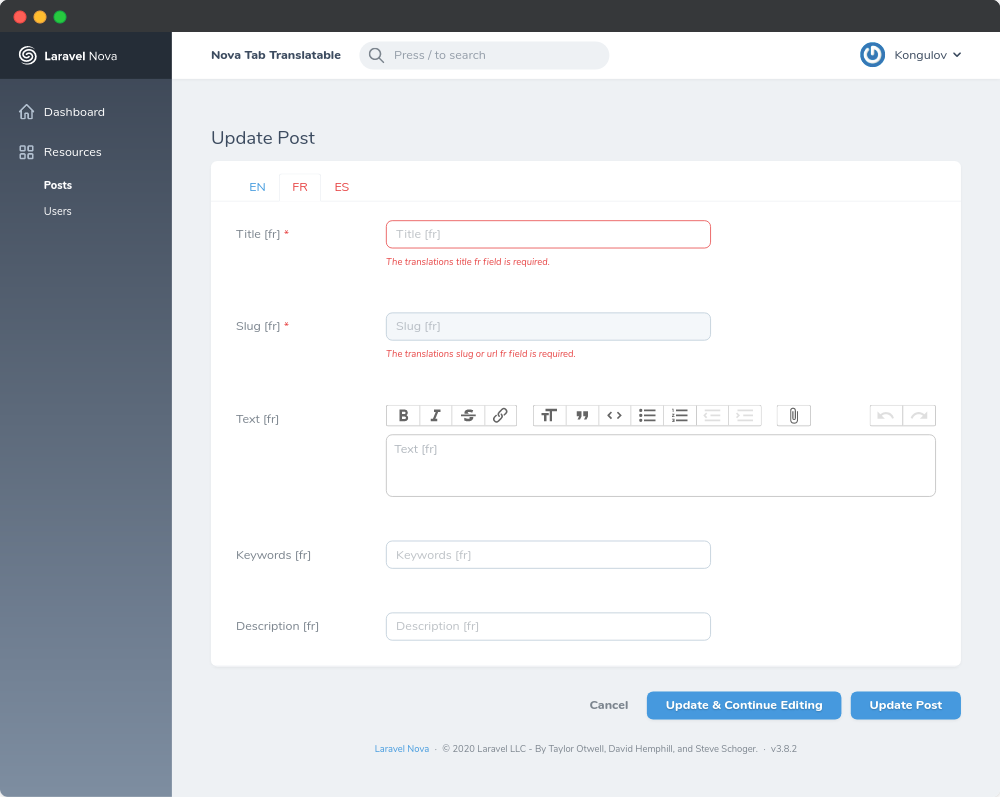
That Post Nova resource will be rendered like this.
Requirements
php: >=7.1.0spatie/laravel-translatable: ^4.0
Installation
Install the package in a Laravel Nova project via Composer:
# Install nova-tab-translatable
composer require kongulov/nova-tab-translatable

# Publish configuration
php artisan vendor:publish --tag="tab-translatable-config"
This is the contents of the file which will be published at config/tab-translatable.php
<?php

return [
    /*
     * The source of supported locales on the application
     * Available selection "array", "database". Default array
     */
    'source' => 'array',

    /*
     * If you choose array selection, you should add all supported translation on it as "code"
     */
    'locales' => [
        'en', 'fr', 'es'
    ],

    /*
     * If you choose database selection, you should choose the model responsible for retrieving supported translations
     * And choose the 'code_field' for example "en", "fr", "es"...
     */
    'database' => [
        'model' => 'App\\Models\\Language',
        'code_field' => 'lang',
        'sort_by' => 'id',
        'sort_direction' => 'asc'
    ],

    /*
     * If you want to save the tab in the last selected language for the whole project, set this "true".
     * But if you want to use in one place call the saveLastSelectedLang(true|false) method
     */
    'save_last_selected_lang' => false,
];
Usage
You must prepare your model as explained in the readme of laravel-translatable. In short: you must add json columns to your model's table for each field you want to translate. Your model must use the Spatie\Translatable\HasTranslations on your model. Finally, you must also add a $translatable property on your model that holds an array with the translatable attribute names.
Now that your model is configured for translations, you can use NovaTabTranslatable in the related Nova resource. Any fields you want to display in a multilingual way can be passed as an array to NovaTabTranslatable.
use Kongulov\NovaTabTranslatable\NovaTabTranslatable;

...

public function fields(Request $request)
{
    return [
        ID::make()->sortable(),

        NovaTabTranslatable::make([
            SluggableText::make('Title')->slug('Slug'),
            Slug::make('Slug')->readonly(),
            Trix::make('text'),
            Text::make('Keywords'),
            Text::make('Description'),
        ]),
    ];
}
If you want to make the field required only in certain languages, then you can use the required_lang rule,
NovaTabTranslatable::make([
    Text::make('Title')->rules('required_lang:en,fr'),
    Trix::make('text')->rules('required_lang:en,fr'),
    Text::make('Keywords'),
    Text::make('Description'),
]),
But if you want to make the field required in all languages, then use the laravel rules
NovaTabTranslatable::make([
    Text::make('Title')->rules('required'),
]),- Replace field name
NovaTabTranslatable::make([
    Text::make('Title')->rules('required'),
])->setTitle('Own Title'),- If you want to save the tab in the last selected language, call the
saveLastSelectedLang()method or in the config replace'save_last_selected_lang' => falsewith'save_last_selected_lang' => true
NovaTabTranslatable::make([
    Text::make('Title'),
])->saveLastSelectedLang(true|false),- If on the index and detail pages you want to turn off the tab and show it each as a row, use trait
TranslatableTabToRowTraitin your resource
class YourResource extends Resource
{
    use TranslatableTabToRowTrait;
    ...
}
Inside a Repeater
NovaTabTranslatable works inside a Repeater that uses the JSON preset:
Repeater::make('Data')->repeatables([
    MyBlock::make('Item'),
]),
If the Repeater also sets uniqueField(), use the TranslatableJson preset. Nova then prunes every
attribute it cannot match back to a field of the repeatable, and since the translated attributes belong
to the fields NovaTabTranslatable wraps, the whole row would be emptied:
use Kongulov\NovaTabTranslatable\Repeater\TranslatableJson;

Repeater::make('Data')
    ->uniqueField('uuid')
    ->preset(new TranslatableJson)
    ->repeatables([
        MyBlock::make('Item'),
    ]),
The preset keeps Nova's pruning for every other attribute, and on Nova 4 it changes nothing.
Credits
License
This project is open-sourced software licensed under the MIT license.
