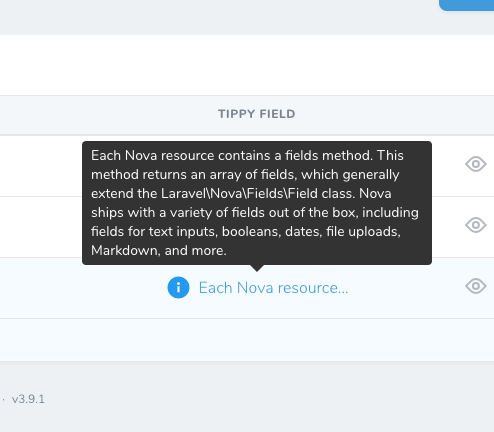
Nova Tippy Field
Laravel Nova field to display Tippy tooltip on the resource index.
On detail will display just like Laravel Nova Textarea.


Installation
composer require monaye/nova-tippy-fieldUsage
use Monaye\NovaTippyField\Tippy;public function fields(Request $request)
{
return [
Tippy::make('Body')
    ->text(Str::limit($this->body, 40))
    ->tipContent($this->body)
];
}Options
Nova Tippy Field comes with various options that you can use to customise how it displayed and availability to pass all the props available to the underlying Tippy instance as well.
text
You can pass excerpt text or any text you want to display to user as hoverable element. There are options to display icon as well see icon or iconUrl for detail.
Tippy::make('Body')
->text(Str::limit($this->body, 40))
->tipContent($this->body)tipContent
Pass the text you'd like to display inside the Tippy tooltip. If tooltip content is empty, it will not display the tooltip at all.
Tippy::make('Body')
    ->text(Str::limit($this->body, 40)),
    ->tipContent($this->body)
iconPath & iconUrl & iconPosition
You can directly pass the path of your local SVG file or URL of the icon or both. Icon position also can be set.
Tippy::make('Body')
    ->text(Str::limit($this->body, 40))
    ->tipContent($this->body)
    ->iconUrl(asset('assets/icons/blue-info.svg'))
    ->iconPath(resource_path('icons/eye.svg'))
    ->iconPosition('right')
placement
placement of the tooltip can be placed in different location. All the available placement position can be found at Tippy Placement Options
Tippy::make('Body')
    ->iconUrl(asset('assets/icons/blue-info.svg'))
    ->tipContent($this->body)
    ->placement('bottom')
tippyOptions
You can pass any props directly that available in the Tippy JS Props. Please note that, some of the props might not work correctly with nova.
Tippy::make('Body')
    ->text(Str::limit($this->body, 40))
    ->tipContent($this->body)
    ->tippyOptions(['arrow' => false, 'placement' => 'bottom'])
shouldShow
Just like the Laravel Nova TextArea field, on detail screen, by default Nova Tippy Field will hide the content and only show when you click on Show Content. You can always show the content in the detail screen.
Tippy::make('Body')
    ->text(Str::limit($this->body, 40))
    ->tipContent($this->body)
    ->shouldShow()
Author
Hope you find it useful. Feel free to reach out with feedback.
Follow me on twitter: @winmonaye