Nova MultiFile
A Laravel Nova field that lets Nova actions accept multiple file uploads with drag-and-drop support.
Features
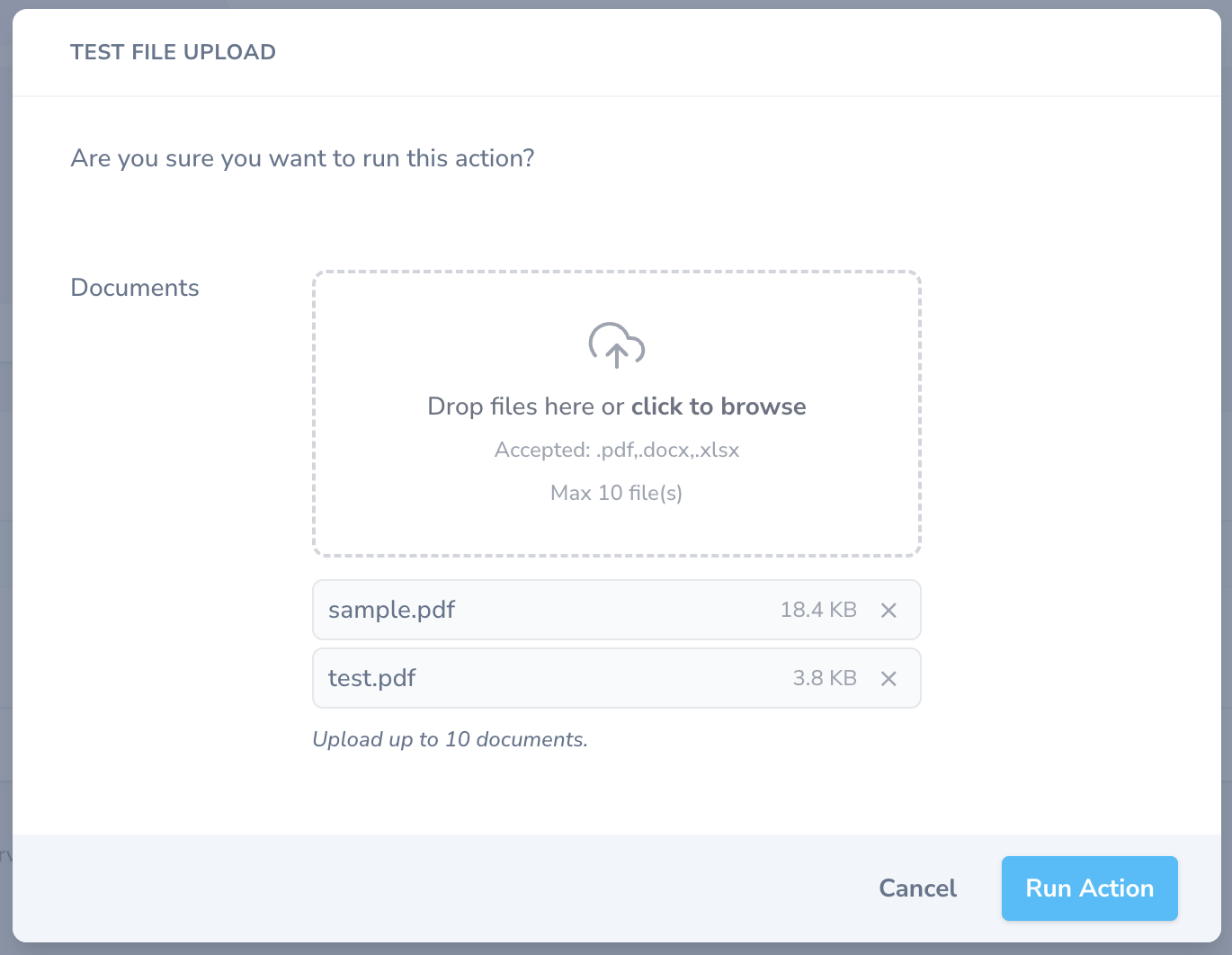
- Drag-and-drop or click-to-browse dropzone
- Displays selected files with name, size, and individual remove buttons
accept()— restrict to specific MIME types or extensions (passed to<input accept>)maxFiles()— cap the number of selectable files- PHP
handle()receives a typedUploadedFile[]array directly via$fields->attribute
Requirements
- PHP ^8.2
- Laravel ^10 | ^11 | ^12 | ^13
- Laravel Nova ^5
Installation
composer require pekhota/nova-multifileNote: Nova is distributed through a private Composer repository. Make sure your project already has
https://nova.laravel.comconfigured incomposer.jsonand valid credentials.
Usage
Defining the field in an action
Important: Nova serializes action field values into its action event log. Because
UploadedFileobjects cannot be serialized, you must addpublic $withoutActionEvents = true;to any action that uses this field.
use Pekhota\NovaMultiFile\MultiFile;

class ImportDocuments extends Action
{
    public $withoutActionEvents = true;

    public function fields(NovaRequest $request): array
    {
        return [
            MultiFile::make('Documents')
                ->accept(['.pdf', '.docx', '.xlsx'])
                ->maxFiles(10)
                ->help('Upload up to 10 documents.'),
        ];
    }

    public function handle(ActionFields $fields, Collection $models): mixed
    {
        /** @var \Illuminate\Http\UploadedFile[] $files */
        $files = $fields->get('documents'); // always an array, or null if nothing uploaded

        if (empty($files)) {
            return Action::danger('No files were uploaded.');
        }

        foreach ($files as $file) {
            $path = $file->store('documents', 'local');
            // … further processing
        }

        return Action::message(sprintf('Imported %d file(s).', count($files)));
    }
}
API
| Method | Description |
|---|---|
accept(string|array $types) |
Comma-separated or array of extensions / MIME types ('.pdf', 'image/*') |
maxFiles(int $max) |
Maximum number of files the user can select |
How the PHP side receives files
The Vue component appends each file to FormData as attribute[]. The field's
fillAttributeFromRequest override reads $request->file('attribute') and writes
a normalised UploadedFile[] to $fields->attribute.
// In your action's handle():
$files = $fields->get('documents'); // UploadedFile[] or null
Building from source
cd nova-multifile
composer install       # installs nova-devtool into vendor/
npm install
npm run prod           # writes compiled assets to dist/
Or use the convenience script from the parent project:
npm run build-nova-multifile-prodChangelog
See CHANGELOG.md.
License
MIT — see LICENSE.